
Wednesday, 11 September 2013
Macro and Console Commando Files for jEdit
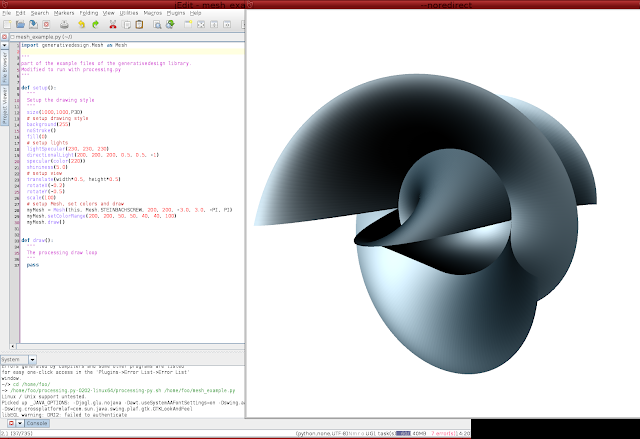
Now you can use jEdit as your ide for processing.py development get the macro and commando files here and here. In my previous posts I included use of a range of processing libraries (toxi, generative design etc). Jonathan Feinberg wouldn't touch them with a barge pole being vehemently anti GPL. However he has made it relatively easy to use the contributed libraries just copy them to processing.py libraries folder (pity he couldn't pick them up from where they get installed by regular processing as we do in ruby-processing). Proof that it all works here for code see previous posting or get it from github here:-

Saturday, 6 April 2013
Using retained shape for performance in processing.py
   1 # CubicGridRetained
   2 #
   3 # You may need to increase the maximum available memory
   4 # by passing -mx1000m to jvm (in run script if you use that)
   5 #
   6 BOX_SIZE = 20
   7 MARGIN = BOX_SIZE * 2
   8 DEPTH = 400
   9 boxFill = None
  10 grid = None
  11 fcount = 0
  12 lastm = 0
  13 frate =  0
  14 FINT = 3
  15
  16 def setup():
  17   size(640, 360, P3D)
  18   frameRate(60)
  19   noSmooth()
  20   noStroke()
  21   global grid
  22   grid = createShape(GROUP)
  23
  24   # Build grid using multiple
  25   for i in range(-DEPTH / 2 + MARGIN, DEPTH / 2 - MARGIN, BOX_SIZE):
  26     for j in range(-height + MARGIN, height - MARGIN, BOX_SIZE):
  27       for k in range(-width + MARGIN,  width - MARGIN, BOX_SIZE):
  28         # Base fill color on counter values, abs function
  29         # ensures values stay within legal range
  30         boxFill = color(abs(i), abs(j), abs(k), 50)
  31         sz = [BOX_SIZE, BOX_SIZE, BOX_SIZE]
  32         cube = createShape(BOX, sz)
  33         cube.setFill(boxFill)
  34         cube.translate(k, j, i)
  35         grid.addChild(cube)
  36
  37 def draw():
  38   background(255)
  39
  40   hint(DISABLE_DEPTH_TEST)
  41
  42   # Center and spin grid
  43   pushMatrix()
  44   translate(width / 2, height / 2, -DEPTH)
  45   rotateY(frameCount * 0.01)
  46   rotateX(frameCount * 0.01)
  47   global grid
  48   shape(grid)
  49   popMatrix()
  50
  51   hint(ENABLE_DEPTH_TEST)
  52   global fcount, lastm, frate
  53   fcount += 1
  54   m = millis()
  55   if (m - lastm > 1000 * FINT):
  56     frate = float(fcount) / FINT
  57     fcount = 0
  58     lastm = m
  59     print("fps: %d" %  frate)
  60
  61   fill(0)
  62   text("fps: %d" %  frate, 10, 20)
  63

Processing.py now updated
Thanks to work by Ralf Biedert processing.py has recently been update to use jython-2.7b1 and processing-2.0b8. It might be interesting to follow his fork in the meantime it has been pulled into the original by Jonathan Feinberg. So you can even update it yourself to the development version of vanilla processing if you wish (strange thing is why opengl is still kept in libraries folder instead of alongside core as P2D and P3D are both rendered using opengl). Here is another Shader example translated to processing.py.

   1 monjori = None
   2
   3 def setup():
   4   size(640, 360, P2D)
   5   noStroke()
   6   global monjori
   7   monjori = loadShader("monjori.glsl")
   8   monjori.set("resolution", float(width), float(height))
   9
  10
  11 def draw():
  12   monjori.set("time", millis() / 1000.0)
  13   shader(monjori)
  14   # The rect is needed to make the fragment shader go through every pixel of
  15   # the screen, but is not used for anything else since the rendering is entirely
  16   # generated by the shader.
  17   fill(0)
  18   rect(0, 0, width, height)

Friday, 30 November 2012
Getting Slightly More Up To Date
The released version of jython is languishing at 2.5.2 (I suspect the jython version number might have some sort of relationship to the version of python supported?). This is likely the case because I was surprised when processing.py did not support "string".format(i). Out of interest I recompiled processing.py wth jython-2.7.2a2 and "string".format is supported. So going forward I intend to use only this or more recent version of jython, since regular python is moving toward version 3.4 (a step change ahead) seemingly some python 3.0 goodness will be back-ported to 2.7 so by the time jython-2.7 is released it will be somewhat more compatible.
Thursday, 29 November 2012
Gray Scott Diffusion (Toxiclibs and Processing.py)
   1 """
   2 <p>GrayScottToneMap shows how to use the ColorGradient & ToneMap classes of the
   3 colorutils package to create a tone map for rendering the results of
   4 the Gray-Scott reaction-diffusion.</p>
   5
   6 <p><strong>Usage:</strong><ul>
   7 <li>click + drag mouse to draw dots used as simulation seed</li>
   8 <li>press any key to reset</li>
   9 </ul></p>
  10
  11 <p>UPDATES:<ul>
  12 <li>2011-01-18 using ToneMap.getToneMappedArray()</li>
  13 </ul></p>
  14 """
  15
  16 """
  17 Copyright (c) 2010 Karsten Schmidt
  18
  19 This demo & library is free software you can redistribute it and/or
  20 modify it under the terms of the GNU Lesser General Public
  21 License as published by the Free Software Foundation either
  22 version 2.1 of the License, or (at your option) any later version.
  23
  24 http:#creativecommons.org/licenses/LGPL/2.1/
  25
  26 This library is distributed in the hope that it will be useful,
  27 but WITHOUT ANY WARRANTY without even the implied warranty of
  28 MERCHANTABILITY or FITNESS FOR A PARTICULAR PURPOSE.  See the GNU
  29 Lesser General Public License for more details.
  30
  31 You should have received a copy of the GNU Lesser General Public
  32 License along with this library if not, write to the Free Software
  33 Foundation, Inc., 51 Franklin St, Fifth Floor, Boston, MA  02110-1301  USA
  34 """
  35 import toxi.color.ColorGradient as ColorGradient
  36 import toxi.color.NamedColor as NamedColor
  37 import toxi.color.ToneMap as ToneMap
  38 import toxi.sim.grayscott.GrayScott as GrayScott
  39
  40 NUM_ITERATIONS = 10 # NB: non-inclusive range in python
  41
  42 def setup():
  43     size(256,256)
  44     global gs, toneMap
  45     gs = GrayScott(width,height,False)
  46     gs.setCoefficients(0.021,0.076,0.12,0.06)
  47     # create a color gradient for 256 values
  48     grad = ColorGradient()
  49     # NamedColors are preset colors, but any TColor can be added
  50     # see javadocs for list of names:
  51     # http://toxiclibs.org/docs/colorutils/toxi/color/NamedColor.html
  52     grad.addColorAt(0,NamedColor.BLACK)
  53     grad.addColorAt(128,NamedColor.RED)
  54     grad.addColorAt(192,NamedColor.YELLOW)
  55     grad.addColorAt(255,NamedColor.WHITE)
  56     # this gradient is used to map simulation values to colors
  57     # the first 2 parameters define the min/max values of the
  58     # input range (Gray-Scott produces values in the interval of 0.0 - 0.5)
  59     # setting the max = 0.33 increases the contrast
  60     toneMap = ToneMap(0,0.33,grad)
  61
  62 def draw():
  63     if (mousePressed):
  64         gs.setRect(mouseX, mouseY,20,20)
  65     loadPixels()
  66     # update the simulation a few time steps
  67     for i in range(0, NUM_ITERATIONS):
  68       gs.update(1)
  69     # read out the V result array
  70     # and use tone map to render colours
  71     toneMap.getToneMappedArray(gs.v,pixels)
  72     updatePixels()
  73
  74 def keyPressed():
  75     gs.reset()

Here is another Gray Scott Diffusion Sketch
   1 """
   2  * <p>GrayScottImage uses the seedImage() method to use a bitmap as simulation seed.
   3  * In this demo the image is re-applied every frame and the user can adjust the
   4  * F coefficient of the reaction diffusion to produce different patterns emerging
   5  * from the boundary of the bitmapped seed. Unlike some other GS demos provided,
   6  * this one also uses a wrapped simulation space, creating tiled patterns.</p>
   7  *
   8  * <p><strong>usage:</strong></p>
   9  * <ul>
  10  * <li>click + drag mouse to locally disturb the simulation</li>
  11  * <li>press 1-9 to adjust the F parameter of the simulation</li>
  12  * <li>press any other key to reset</li>
  13  * </ul>
  14  *
  15  * <p>UPDATES:<ul>
  16  * <li>2011-01-18 using ToneMap.getToneMappedArray()</li>
  17  * </ul></p>
  18 """
  19
  20 """
  21 Copyright (c) 2010 Karsten Schmidt
  22
  23 This demo & library is free software you can redistribute it and/or
  24 modify it under the terms of the GNU Lesser General Public
  25 License as published by the Free Software Foundation either
  26 version 2.1 of the License, or (at your option) any later version.
  27
  28 http:#creativecommons.org/licenses/LGPL/2.1/
  29
  30 This library is distributed in the hope that it will be useful,
  31 but WITHOUT ANY WARRANTY without even the implied warranty of
  32 MERCHANTABILITY or FITNESS FOR A PARTICULAR PURPOSE.  See the GNU
  33 Lesser General Public License for more details.
  34
  35 You should have received a copy of the GNU Lesser General Public
  36 License along with this library if not, write to the Free Software
  37 Foundation, Inc., 51 Franklin St, Fifth Floor, Boston, MA  02110-1301  USA
  38 """
  39 import toxi.color.ColorGradient as ColorGradient
  40 import toxi.color.NamedColor as NamedColor
  41 import toxi.color.ToneMap as ToneMap
  42 import toxi.sim.grayscott.GrayScott as GrayScott
  43
  44 def setup():
  45     size(256,256)
  46     global gs, img, toneMap
  47     gs = GrayScott(width,height,True)
  48     img = loadImage("ti_yong.png")
  49     # create a duo-tone gradient map with 256 steps
  50     toneMap = ToneMap(0,0.33,NamedColor.CRIMSON,NamedColor.WHITE,256)
  51
  52 def draw():
  53     gs.seedImage(img.pixels,img.width,img.height)
  54     if (mousePressed):
  55         gs.setRect(mouseX, mouseY,20,20)
  56     loadPixels()
  57     for i in range(0, 10):
  58         gs.update(1)
  59     # read out the V result array
  60     # and use tone map to render colours
  61     toneMap.getToneMappedArray(gs.v,pixels)
  62     updatePixels()
  63
  64 def keyPressed():
  65     if (ord(key)>=49 and ord(key)<=57):
  66         gs.setF(0.02 + (ord(key) - 48) * 0.001)
  67     else:
  68         gs.reset()
  69

Subscribe to:
Posts (Atom)